1
Learn What SafetyPulse does for you
2
Explore See the dashboard and reports
3
Get Started Contact us to get started
Now available for your policy

Stop reacting. Start preventing.

As part of your workers' comp coverage, you now have access to SafetyPulse, an AI-powered monitoring system that uses your existing cameras to help prevent workplace injuries before they happen.

What SafetyPulse does for your organization

Real-time visibility into workplace safety, helping you prevent incidents, reduce claims, and protect your people.

Prevention

Catch risks before they become injuries

SafetyPulse uses AI to monitor your camera feeds continuously, flagging unsafe behaviors like missing PPE or blocked exits as they happen, not after an incident report.

Clarity

Know exactly where to focus

Every alert is ranked by severity with a recommended action. Your safety team spends less time investigating and more time intervening where it matters most.

Visibility

Keep leadership informed with real data

Executive Reports deliver aggregated safety insights directly to leadership inboxes, connecting safety performance to loss ratios and renewal outcomes.

Consistency

Ensure consistent application of safety best practices

Monitor across many disparate locations to ensure consistent application of safety best practices on an ongoing basis. Compare safety performance across sites and ensure accountability everywhere you operate.

Jack Nix
People take shortcuts. The camera sees it — and now we do too. At first, they might push back, but eventually, they realize — this company actually gives a damn.

How it works

📹

Your Cameras

Existing security cameras stream through your Video System

🧠

AI Analysis

CompScience AI detects unsafe behaviors in real time

🔔

Smart Alerts

The right people get notified by severity and role

📊

Reports

Daily briefs and executive reports drive action

💡

SafetyPulse works with your existing camera system. We support most major video systems and can also provide a video system for you. Reach out today to discuss a solution.
Next: see the actual dashboard and reports you'll have access to.

Explore the Product

What you'll have access to

A real-time dashboard, daily briefs for your supervisors, and executive reports for leadership, all included.

1 Alert Monitoring
SafetyPulse Dashboard

SafetyPulse Dashboard

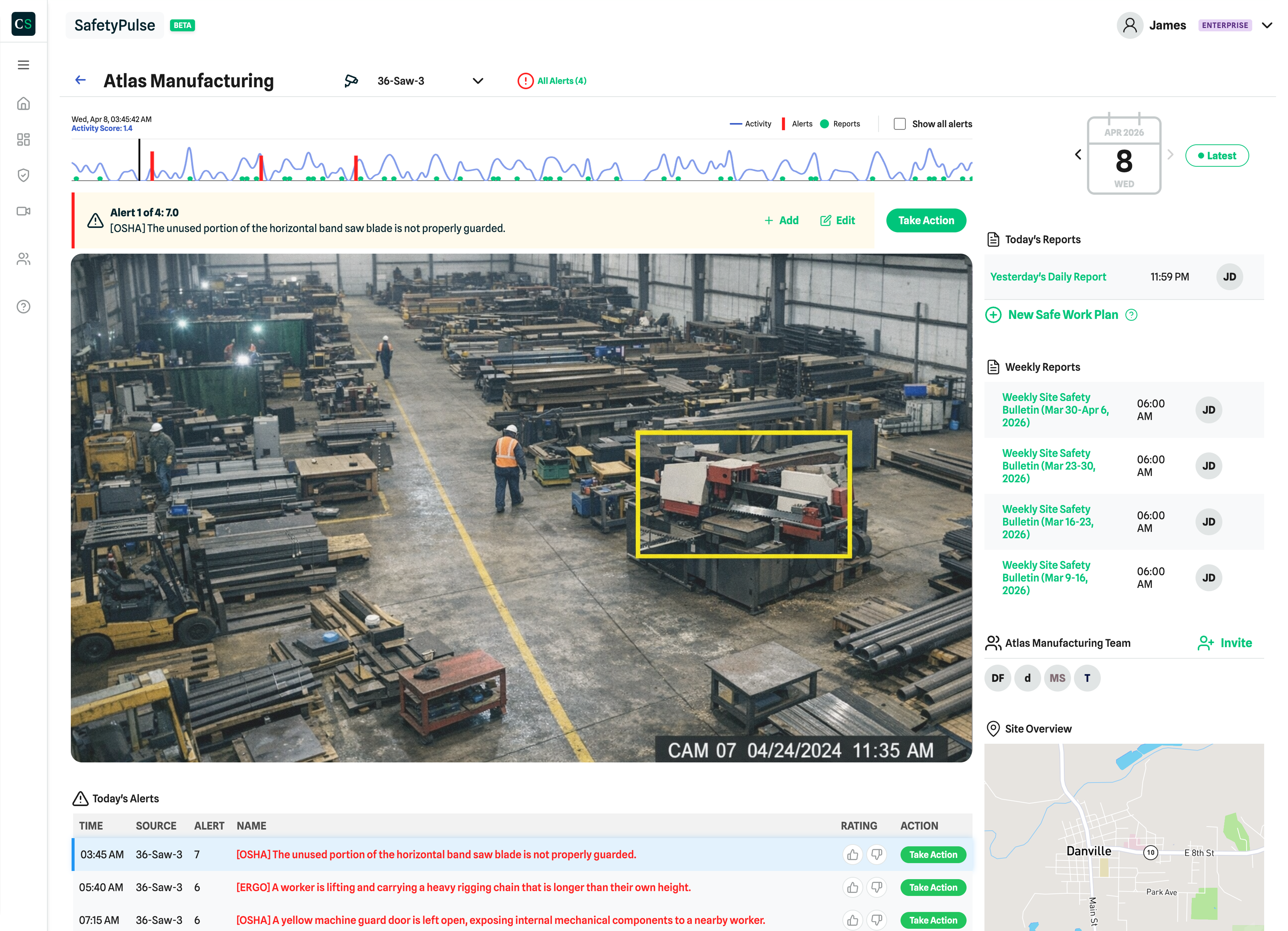
A single view of safety across all your sites. See AI-flagged events as they happen, review alert history, and track which issues have been addressed.

📷
Real-time camera feeds with AI-annotated safety observations, severity ratings, and timestamps
⚠️
Alert log with source, severity, OSHA classification, and one-click action buttons
📈
Activity timeline showing alert patterns throughout the day so you can spot peak risk periods
2 Daily Report
Supervisor Daily Brief

Supervisor Daily Brief

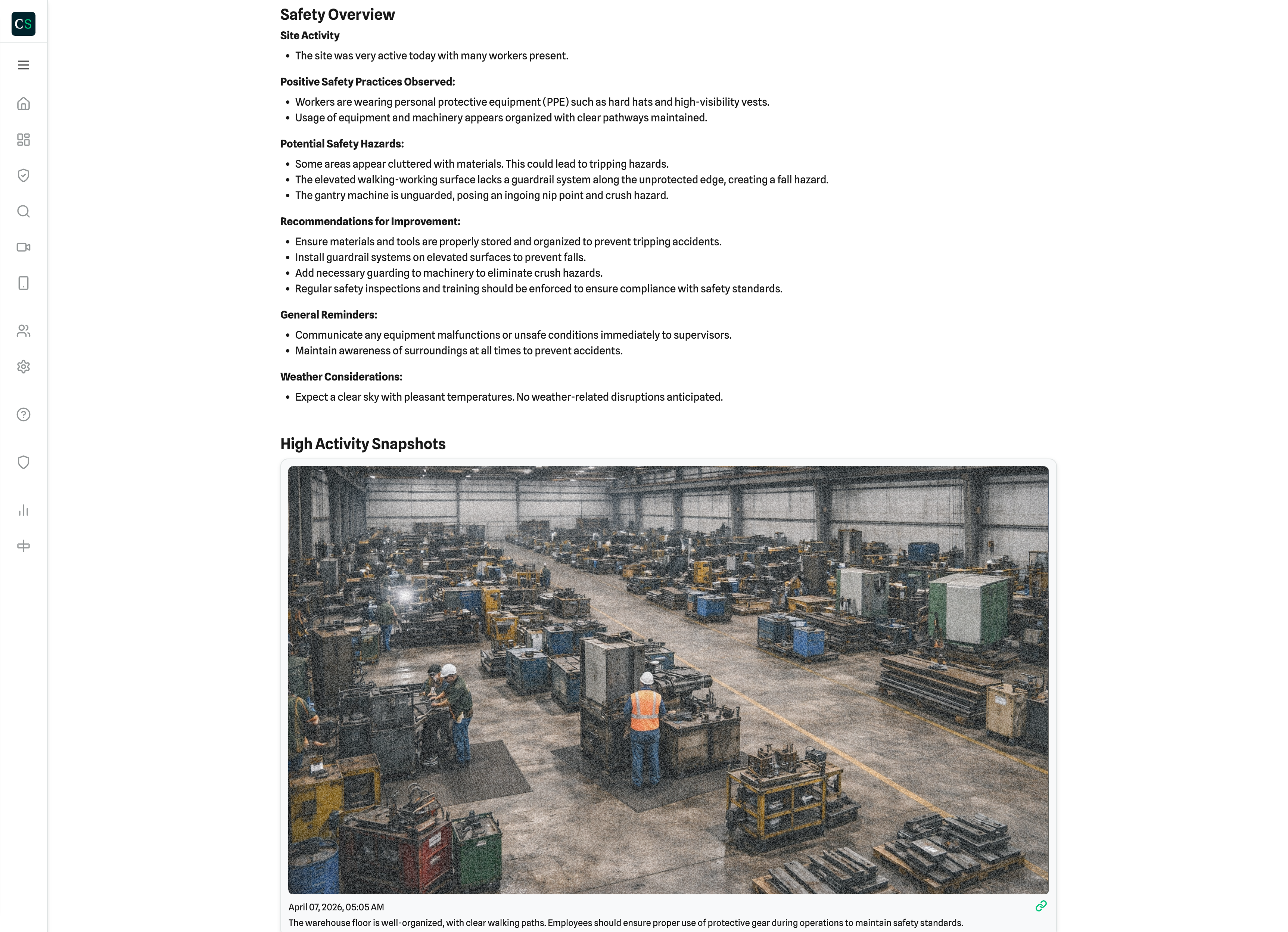
A morning summary for site supervisors, covering what happened, what needs attention, and what's going well. Delivered daily so your foremen start informed.

🎯
Actions Taken and unaddressed alerts surfaced first so nothing falls through the cracks
📷
Camera Activity grid with alert counts, activity scores, and time since last event
📸
High Activity Snapshots - actual camera images with AI descriptions of what was detected
3 New — Monthly Report
Executive Report

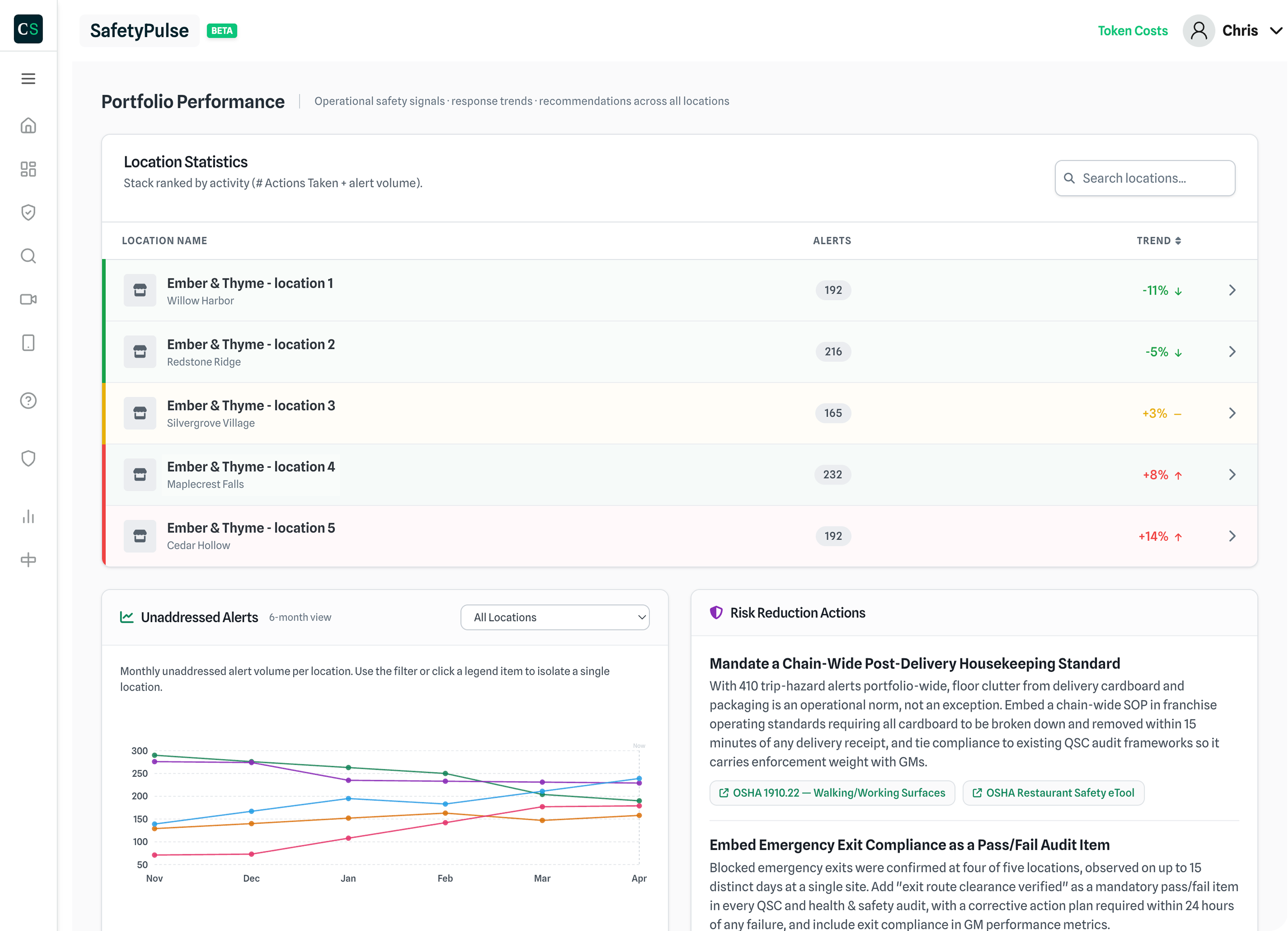
Executive Reports

Periodic aggregated insights delivered to leadership inboxes. Built to give executives the safety data they need without logging into a dashboard.

📊
At-a-glance metrics - total alerts, actions taken, engagement rate, and overall risk level
🔴
Hazard Clusters grouped by type (egress, contamination, slip hazards) with image evidence
Recommended Actions - specific next steps your team can act on

SafetyPulse gives you real-time, behavior-based safety insights, the kind of visibility that was previously only available through expensive consulting engagements. It's now included as part of your CompScience policy.

Included at no additional cost for eligible policyholders

Ready to get set up? Here's what the process looks like.

See Setup Process

Getting set up

Our team handles most of the work. Here's what the process looks like and what we'll need from you.

1

Kickoff Call

Your CompScience Customer Success Manager schedules a call to review your sites, walk through your camera setup, and select the best cameras (up to 10) for monitoring high-risk areas.

You: join a 30-min call
2

Camera Configuration

Our engineering team works with your IT contact to connect the Video System to your network and configure camera access. We handle the technical work.

You: connect us with IT We: handle setup
3

Calibration & Tuning

SafetyPulse begins analyzing footage and calibrating to your environment. We tune alert thresholds together, so notifications are meaningful from day one.

We: calibrate everything

You're Live

Your dashboard is active, alerts start flowing, and your first Supervisor Daily Brief arrives the next morning. Our team is available for technical support and follow up.

Ready to activate SafetyPulse?

Reach out to schedule your kickoff call.

Contact us to get started
Included with your policy - no additional cost
Works with your existing cameras
Typically live within 20 days
Dedicated support throughout

FAQ

SafetyPulse uses AI-powered computer vision to monitor your existing camera feeds and identify unsafe behaviors in real time. This helps you prevent injuries before they happen, reduce workers' comp claims, and build a stronger safety culture across your sites — all at no additional cost as part of your CompScience policy.

SafetyPulse analyzes camera feeds from your existing cameras to detect safety-related behaviors such as missing PPE, blocked egress paths, and slip hazards. We process data in real time. AI-generated safety observations, alert metadata, and snapshots are retained for reporting purposes. We are SOC2 compliant and value customer trust and privacy.

SafetyPulse data is used to help you improve workplace safety and reduce incidents. Demonstrating measurable safety improvements through SafetyPulse can positively contribute to more favorable renewal outcomes over time, as fewer claims and better loss ratios are reflected in your policy performance.

Contact your CompScience Customer Success Manager to schedule a kickoff call. During that call, we'll review your sites, select the best cameras for monitoring, and coordinate with your IT team for setup. Most customers are fully live within 20 days.